What network security is
Network security is the set of measures that protect a network and what travels across it. The goal comes down to three words that are worth not repeating from memory, because each one means different work: confidentiality (only the right people read it), integrity (nobody alters it on the way) and availability (it is still there when it is needed).
What almost no definition says is that network security was born with an assumption underneath it: that there is an inside and an outside, that the danger is outside and the people you trust are inside. That assumption is what holds up the firewall, the VPN and a good part of what gets bought. And it is exactly the assumption that collapses the moment somebody gets in, which is what always happens.
How it is organised: three layers doing three different jobs
It helps to think of it in three blocks, because each one answers a question and none of them covers the others'.
- Who gets in. Access control: firewalls, VPN, multi-factor authentication and, across the wired and wireless network, 802.1X, which demands an identity from the device before giving it any network at all. It is what stops plugging a cable in a meeting room from being the same thing as being on the network.
- Who sees what is happening. Detection and response. This is where most companies have the gap: not in having no tools, but in nobody reading what the tools say.
- What protects the data itself. Encryption in transit and at rest, and access control over the information, not just over the network. It is the layer that still counts once the other two have failed.
The useful question is not which of the three you have, but which one is weakest. An attacker does not attack your average.
Segmentation, microsegmentation and Zero Trust
This is the part an earlier version of this guide was missing, and it is the one that most changes the outcome of a real attack.
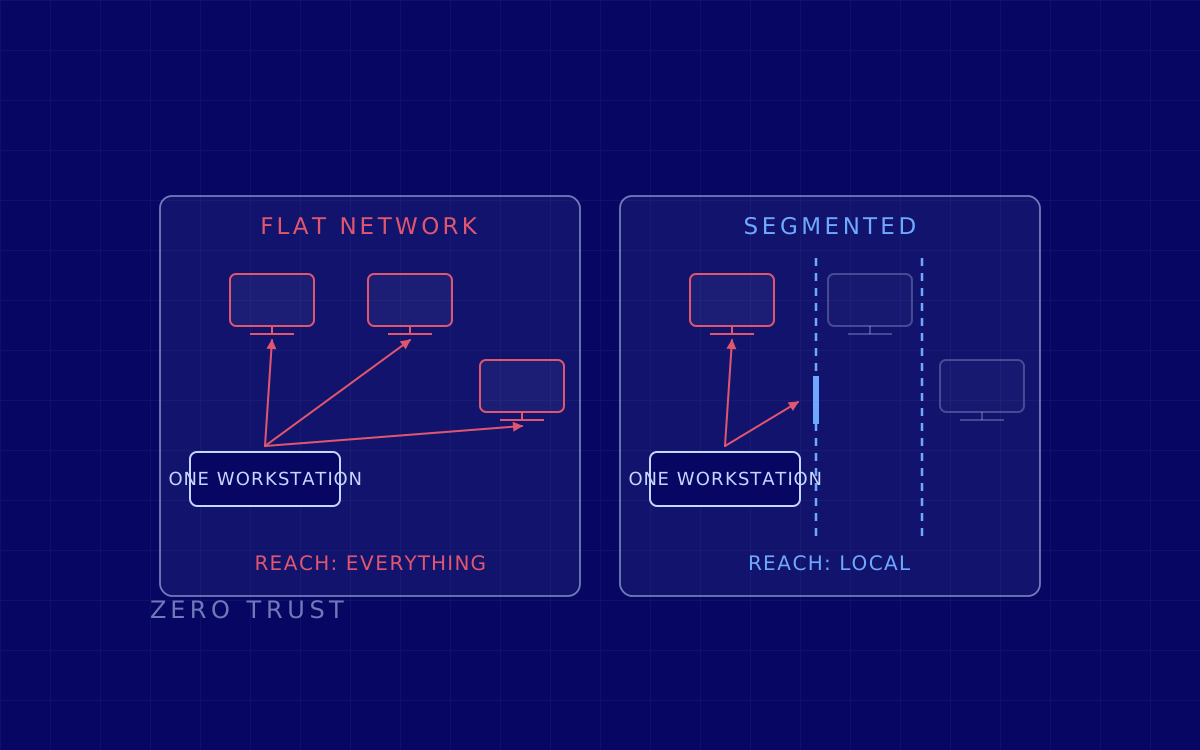
Network segmentation means dividing the network into zones that do not talk to each other except where they need to. It sounds obvious and it is what we find least often: the flat network, where an administration laptop can reach the production server, the printer and the machine on the shop floor, is still the norm. On a flat network, compromising any one workstation means compromising that workstation’s reach, which is everything.
Microsegmentation takes the idea down to the workload: not large zones, but allowing server to server only what is genuinely used. It costs more because it requires knowing what talks to what, and that inventory almost never exists. But it is exactly the work that turns an intrusion into a local problem.
And Zero Trust is not a product, however hard it is sold as one. It is throwing out the assumption from the first section: stop granting trust for being inside the network, and start checking identity, device health and permission on every single access. Its concrete remote access form is ZTNA, which unlike a classic VPN does not put you on the network: it gives you access to one specific application and nothing else. That difference is what decides what happens the day a home laptop turns up with a credential stealer inside it.
Wireless, and a correction that needs saying out loud
An earlier version of this guide recommended encrypting the wireless network with "WEP, WPA or WPA2". That was wrong, and we are correcting it here, on the same page, instead of quietly deleting it.
- WEP is not used. It has been broken for more than two decades and it falls in minutes to public tools. If it turns up anywhere, that equipment has been sitting there since before anybody was looking.
- Original WPA is out too. It runs on TKIP, which has been retired.
- WPA2 is still acceptable with a long random password, and it is what most networks have. Its real problem is not the algorithm: it is that the password is the same for everybody, never expires, and is written on a whiteboard.
- WPA3 is what to ask for on new equipment, because it changes the way the key is negotiated and removes the attack of capturing the initial handshake and trying passwords against it later at leisure.
- And in a company, what really matters is not the protocol, it is the model. With 802.1X every person and every device comes in with their own identity, so removing somebody’s access actually removes somebody’s access, rather than changing the wireless password for the entire office.
How all of this gets tested in practice is covered in how a wireless pentest works.
Where it actually breaks
When we test a network from the inside, with permission, the findings repeat so much that they could almost be written before we arrive. They are not exotic vulnerabilities: they are decisions taken once that nobody looked at again.
- The network is flat even though the diagram says it is not. The diagram is four years old and the temporary exceptions are still in place.
- Old protocols left switched on for compatibility with a system nobody uses any more, and which let one machine pass itself off as another.
- One password that works in a lot of places, usually a service account or the local administrator of the workstation, identical across a thousand machines.
- And nobody watching. This is the finding that causes the most discomfort, because it shows up in no scanner: it is not that there were no alerts, it is that there were and nobody saw them.
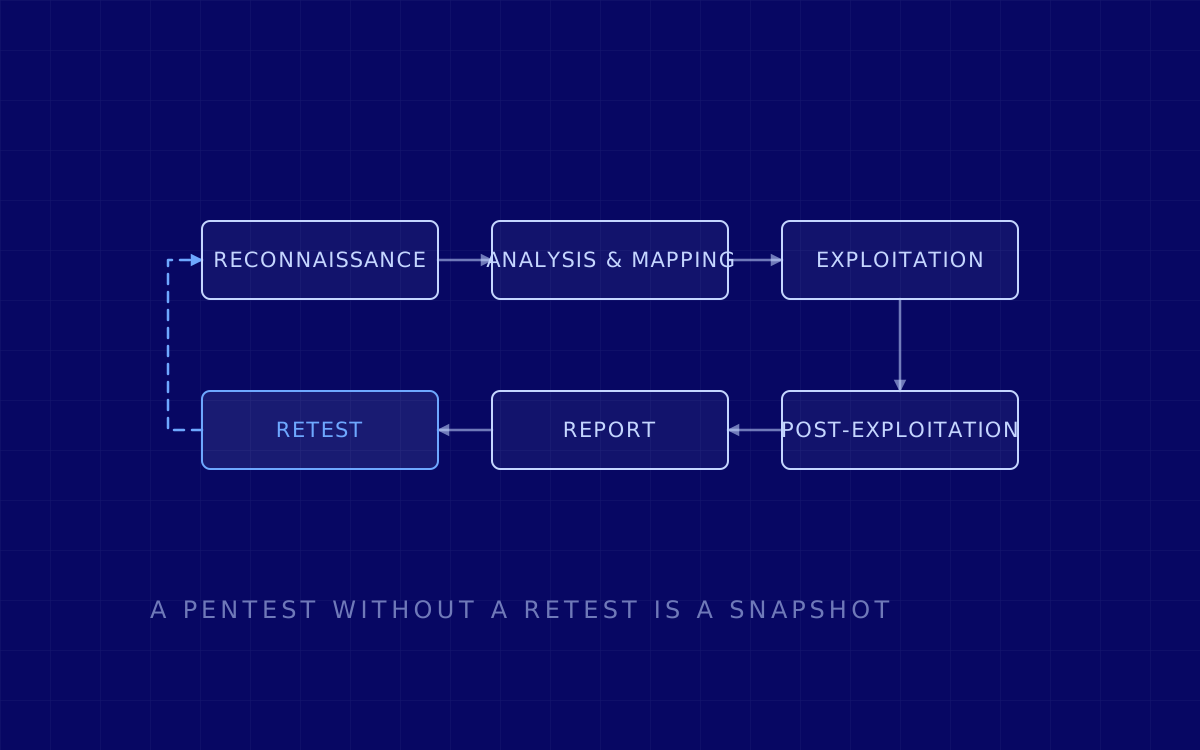
The way to check this is not to audit the configuration, it is to walk it. An internal network pentest starts from the inside and measures how far somebody who is already in can get, which is the question network security exists to answer. It is told step by step in how an internal network pentest works. What you expose outwards is looked at separately, with an external network pentest, and the air with a wireless pentest, because the wireless perimeter leaves the building and no firewall controls it.
What to do with this
Three things you can look at without buying anything, and they order the rest.
First, take your network diagram and ask whether anybody has checked it against reality this year. If the answer is no, the diagram is a hypothesis. Second, pick the system it would hurt most to lose and ask how many hops there are from any one person’s laptop to it. If nobody knows the answer, there is no real segmentation, whatever the paper says. And third, look at the wireless: which protocol, who knows the password, and when it was last changed.
None of the three needs a budget. All three produce a number, and with a number you can decide. Without one, network security turns into a shopping list.
Last reviewed: 3 August 2026. Originally published on 26 November 2023.