What malware is, and why the word virus stuck
Malware is any software written to do something you did not want: steal, encrypt, spy, delete or use your resources. It is the umbrella term.
"Virus" is one of the families underneath it, and for historical reasons it ended up naming all of them. The confusion is not harmless: a virus is the malware that attaches itself to another file and needs somebody to run it in order to replicate. A worm is not one, because it travels on its own. A trojan is not one either, because it does not replicate: it disguises itself. Ransomware is not one either, because it is a business model that can arrive by many routes. All of them are malware; only one of them is a virus.
And this changes what you do. Somebody who thinks they have "a virus" looks for a program to clean up a file. Somebody with a credential stealer inside does not have a file problem: their passwords are outside, and cleaning the machine does not bring them back. The word you use decides where you look.
The two axes that actually classify
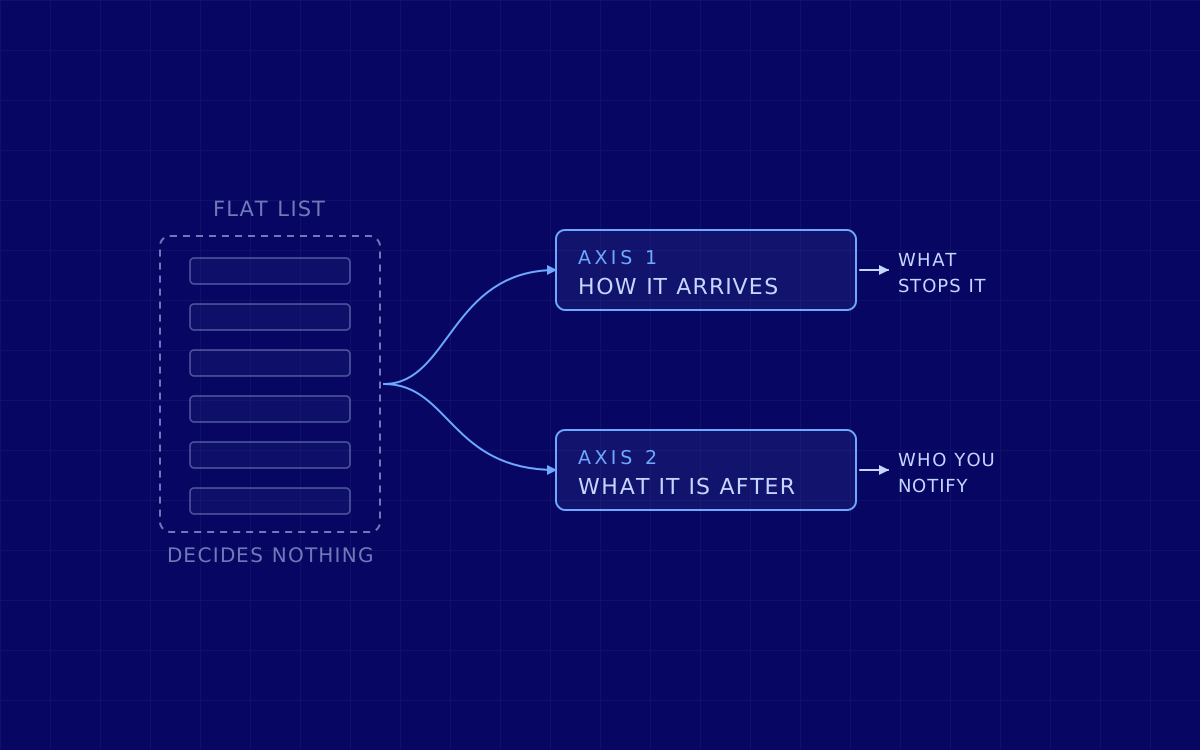
A flat list of names helps you decide nothing, because it mixes two different questions. Separated, they become useful.
Axis 1: how it arrives and how it stays. This is the preventive defence axis, because two families that come in through the same door get stopped by the same thing.
- It needs somebody to run it. Viruses, trojans and almost everything that arrives by email. Stopped by filtering what comes in and limiting what can be executed.
- It spreads on its own. Worms, which jump from machine to machine unaided. Stopped by segmenting the network and patching, not by training people.
- It brings no file. Fileless malware lives in memory and leans on tools that are already on the system, the so called LOLBins. There is no file to analyse, so signature detection has nothing to hold on to.
- It stays. Rootkits and backdoors. They are not an end in themselves, they are the guarantee of being able to come back.
Axis 2: what it is after. This is the impact axis, and the one that decides who you notify and what you recover.
The families seen in business today
Ordered by what they are after, which is the second axis.
- Money through a ransom: ransomware. It encrypts and demands payment. For years now it has not been written by whoever uses it: it works as a service, with development on one side and the attack on the other. And it is almost never just encryption any more: first they take the data out and then they threaten to publish it on a leak site, so that having backups stops being enough.
- Credentials: infostealers. The ones we come across most often at the start of a corporate intrusion. They get in, empty out whatever is stored in the browser (passwords, session cookies, tokens) and leave. The stolen session is the worst part: it gets you in with no password and no second factor. And what is stolen gets sold, so an infection on a laptop at home ends up being the way into your company months later.
- Surveillance: spyware and keyloggers. They watch instead of stealing in one go: keystrokes, screen, microphone, location.
- Your resources: cryptojacking and botnets. They are not after your data, they are after your compute and your connection. It looks like the least serious one and it has an uncomfortable reading: if somebody can mine on your servers, they can do other things on your servers.
- Destruction: wipers. They erase, and sometimes they disguise themselves as ransomware to buy time. No ransom is worth anything because there is no way back. This is the family associated with conflict and sabotage, not with profit.
- Nuisance and monetisation: adware. The least dangerous and the most frequent. It matters for what it indicates: if this got in, the door it came through is still open for something worse.
How to know whether you are infected, and what to do if you are
The usual list of symptoms (the machine is slow, windows pop up, programs close on their own) still holds, but the thing almost no page says has to be said: those signs belong to the malware that does not mind being noticed. Adware wants you to see it, because that is what it lives on. A miner shows up because the fan never stops. The one that actually does the damage tries the opposite: a rootkit exists so that you do not see it, a backdoor can sit there for months doing nothing, and a credential stealer works once and deletes itself.
A practical rule, uncomfortable but honest: noticing something odd is reason enough to look, and noticing nothing is not a reason to be calm. In a company the signs that are worth having are not on the machine, they are in the accounts: sign ins from places where nobody was, new forwarding rules on a mailbox, second factors registered that nobody registered.
And once the suspicion is there, the order matters. The first three steps are the ones people skip and the ones that stop a small incident from becoming a big one.
- 1. Disconnect it from the network, do not power it off. Pull the cable and the wifi. Powering it off wipes what only exists in memory, which is sometimes the only evidence of what happened and of what was taken.
- 2. Do not sign in on that machine with an account that has more privileges. It is the classic mistake: the person who administers turns up, logs in with their own account to fix it, and hands their credentials to whoever is inside.
- 3. Change the passwords from ANOTHER device, starting with email, which is the key to recovering everything else. Changing them from the suspect machine is handing them over.
- 4. Revoke the sessions and review the second factors. An authentication method that you did not register is a door that stays open however many times you change the password.
- 5. Look at the mailbox before calling it resolved: automatic forwarding rules and delegated access permissions. It is the first thing that gets touched when somebody gets into a company mailbox and the last thing anybody reviews.
- 6. Rebuild instead of cleaning, if the machine matters. A scan that says "clean" only means that it found nothing.
- 7. If this is a company, notify whoever has to be notified before touching anything else. There are legal deadlines that start running on their own, wherever you operate, and they do not depend on whether there turned out to be any damage.
And one thing that is on no list and decides the outcome: write down what you are doing, with the time. What you saw, when, what you touched. If this turns out to be something serious, that note is the difference between reconstructing what happened and guessing it.
On which program detects what, and why a classic antivirus does not see a good part of the above, there is what an antimalware is. The two articles answer different questions and deliberately do not repeat each other.
What a company does with this list
This is where the previous version of this article jumped straight to offering pentesting, and the jump did not hold up: somebody searching for types of malware is not buying an audit. The bridge, where there is one, is this.
Look at axis 1 again. Almost every family comes in through two doors: a person, or something of yours that is exposed and unpatched. The first one gets checked with a controlled phishing exercise, which measures how many people report it and how long they take, not how many click. The second one gets checked by looking from outside at what you have published, which almost never matches what you think.
And axis 2 leads to the question that no list of malware answers: if something gets in, how far does it get? An antivirus does not answer that; walking the route does. An internal network pentest starts from inside and measures how far somebody who is already there can move. The difference between one infected machine and a company at a standstill is usually exactly there, and it is the only thing on this whole page that can be measured in advance.
Last reviewed: 4 August 2026. Originally published on 27 November 2023.