What it is and what it solves
Authenticating is proving you are who you say you are, and that is done with three kinds of proof: something you know (a password), something you have (a phone, a physical key) and something you are (a fingerprint, your face).
Two-factor authentication means requiring two of different kinds. Two passwords are not two factors: they are the same thing twice.
What it solves is specific and enormous: it destroys the value of a stolen password. And when an intrusion begins with a valid credential, leaked somewhere else, reused, or lifted by an infostealer, the second factor is what stops that credential from being enough to get in. Without it, a credential stuffing attack turns somebody else’s breach into an account takeover at your company.
What it does not solve is what comes afterwards. And that is the rest of this page.
SMS is not a good second factor, and it needs saying
An earlier version of this guide listed SMS and phone calls as valid methods with no warning attached. That was wrong, and it gets corrected here, because it is the most important thing in the whole article.
A code sent by SMS can be intercepted in three different ways, and none of them is exotic:
- SIM swapping. Somebody convinces your mobile operator that something has happened to your phone and that your number needs moving to a new SIM. From that moment the codes arrive on their handset. Nobody has to touch your phone or your systems: the attack is against the operator’s customer service desk.
- The telephone network. Message routing between operators was never designed on the assumption that an SMS would be carrying a credential.
- The lock screen. Plenty of phones show the contents of an SMS without being unlocked.
Voice calls have the same problems and add one more: a recognisable voice can now be cloned from publicly available material, so "we are calling you to verify" has stopped verifying anything.
That said, and this matters: SMS is better than nothing. If the realistic alternative in a company is no second factor at all, put SMS in and improve it later. What is not acceptable is publishing it as good practice, or leaving it in place where there is something genuinely worth protecting.
The methods in order, worst to best
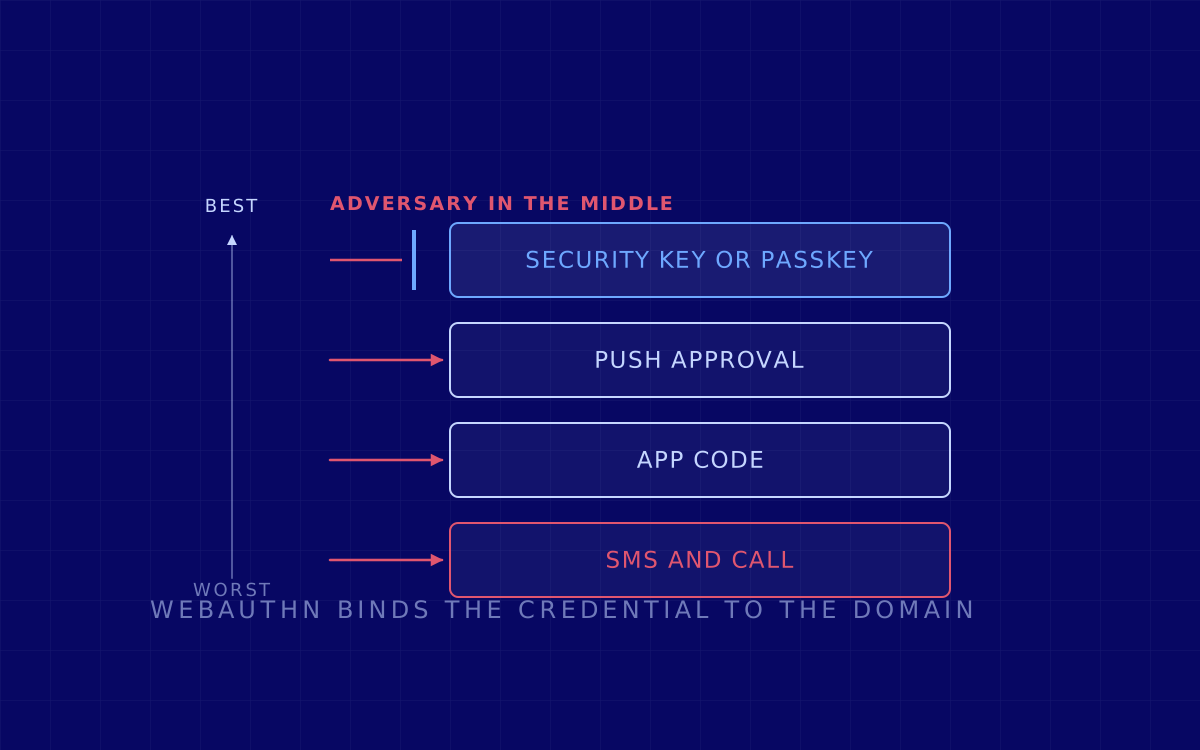
- SMS and phone call. Better than nothing, and the first thing to replace.
- App code (the six digits that rotate). Much better: the code is generated on the phone and never travels over the telephone network. It is still relayable, which is the key word in the next section.
- Approval prompt of the "is this you?" kind. Convenient, and vulnerable to fatigue: if approving is a yes button, persistence is enough. It only counts if it forces you to type a number shown on the computer screen into the phone, because that ties the approval to one specific session.
- Physical security key or passkey. The only group that is not relayable.
Passkeys are the version of this that already ships on the phone and the laptop, with nothing to buy. Underneath they are WebAuthn and FIDO2, which is the standard doing the work, and their important property is this: the credential is bound to the real site’s domain. If the page is a copy, the browser simply does not use it, and the user cannot get it wrong even if they try.
From there to removing the password altogether is one step, which is the passwordless approach.
How 2FA gets bypassed in practice
Three ways, and only the first is genuinely technical.
1. Getting in the middle. This is adversary in the middle, and it is what turns up in phishing today. The fake page does not store your password: it forwards it to the real one in real time, shows you the genuine second factor prompt, you type the correct code, and the attacker keeps the session cookie the site issues afterwards. With that cookie they are already inside, and the second factor is not asked for again because it has already been passed.
This is what makes six digit codes useless against well built phishing, and what makes a passkey work: a passkey cannot be typed into the fake page.
2. Wearing the user down. With the password already stolen, approval prompts are fired off until somebody presses yes to make it stop, usually at night. That is why it matters that approval forces you to type the number from the screen.
3. Going around it. The most frequent and the most boring: stealing the already open session with an infostealer (that is session hijacking), or coming in through an old protocol that does not even know how to ask for a second factor. That is what the next section is about.
In a company: the part almost nobody finishes
Turning the second factor on is the beginning. What decides the outcome is what gets done afterwards, and that usually stops halfway.
- Retiring legacy authentication. Old mail protocols do not know how to ask for a second factor: if they are still enabled, there is a door next to the one you locked that never asks. It is the most repeated cause of "we had 2FA and they got in anyway".
- Conditional access. Deciding what to ask for depending on who, from where and on which device, instead of asking the same thing every time. It is also what lets you demand a strong method only where it is needed, without driving the whole workforce mad.
- Covering 100%, not 90%. The accounts that get an exemption from the policy tend to be the administration accounts, the service accounts and the board’s, which is to say exactly the interesting ones. A permanent exception is a permanent door.
- Watching the session, not just the login. Shortening session lifetimes, and being able to kill them all at once, is what limits the damage when a cookie is stolen.
- SSO done properly, so that there is one place to apply all of this instead of twenty.
In Microsoft 365 environments this is a specific, bounded configuration review: M365 hardening.
What to do this week
In order, and without needing a project:
- Second factor mandatory on everything facing the internet, starting with mail, VPN and remote access.
- Take SMS off the administration accounts and replace it with an app or, better, with a passkey.
- Check whether legacy authentication is still enabled. It is a query, not a project, and it usually produces surprises.
- Passkey or physical key for the small group that can do everything: systems administration, finance leadership and whoever approves payments.
- Store the recovery codes somewhere other than the mailbox you are protecting.
- And test it. A phishing simulation that uses the middleman technique measures the only thing that matters: whether your second factor holds against what is actually used.
For how this gets used against a company in fraud, see business email compromise. And if you want a specific case looked at, get in touch.