What a domain controller is
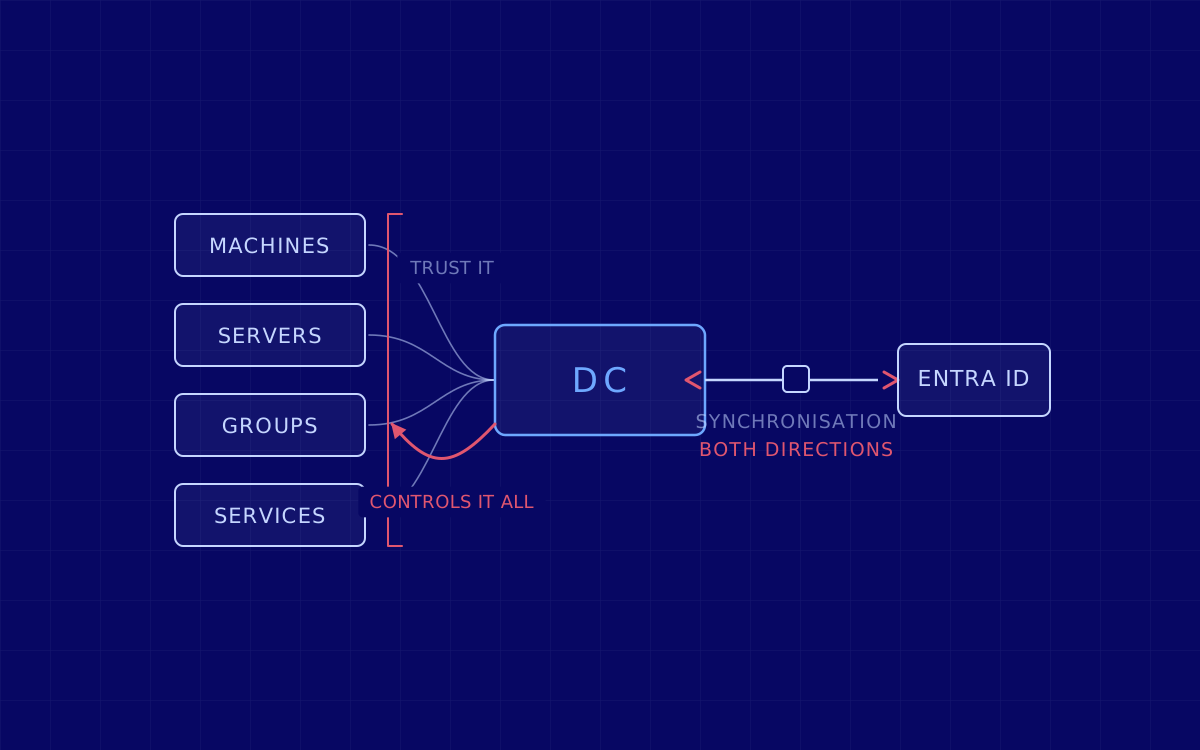
A domain controller (DC) is a Windows server that holds the directory for a domain and answers two questions all day long: who are you, and what am I letting you do. That directory is not just people’s accounts: it also holds the machines, the groups, the printers, the services and the configuration rules applied to all of them.
A domain is the set of resources that share that directory and trust it. And the trust is literal: when you join a laptop to the domain, that laptop accepts that the domain controller gets to say who can log in and with what permissions. The convenience of administering a thousand machines from one place and the risk of that one place falling over are exactly the same property seen two ways.
The technology underneath is Active Directory, in its domain services form. On a network with several domain controllers they all replicate the same database, so if one goes down the rest keep answering.
What it actually does
Three things, and it is worth keeping them apart because each one is attacked differently.
- Authenticate. Check that you are who you say you are. On a modern domain that job belongs to Kerberos, which instead of sending passwords around the network hands out time-limited tickets: one that says who you are, and one for each service you are going to talk to. Underneath it, the older mechanism, NTLM, is still there, switched on in a great many networks for compatibility, and a good part of the problems on this page come from exactly that.
- Authorise. Decide what you can reach. It is resolved through the groups you belong to, and that is why group membership is a target in its own right: you do not need to steal the administrator’s password if you can get yourself into the administrator’s group.
- Apply policy. Push configuration to every machine in the domain, from the desktop wallpaper to what is allowed to run. It is the most powerful administration tool there is on a Windows network, and for that same reason it is a perfect distribution mechanism for whoever controls it.
Do you even need one today? Domain, Entra ID and hybrid identity
This is the part an earlier version of this guide was missing, written back when the answer looked obvious. Today there are three scenarios and choosing the wrong one is expensive.
- Cloud only. If your people work on laptops, with cloud services, and there is no file server and no legacy application in the way, you probably do not need a domain: identity lives in Microsoft Entra ID (what until recently was called Azure AD) and the machines join it directly. It is what usually fits a young company.
- Domain only. It still makes sense when you have to authenticate against things that do not speak cloud protocols: file servers, printing, older internal applications, machinery, industrial environments.
- Hybrid. This is what we find in most of the companies we work with: an on-premises domain synchronised with Entra ID so that people sign in with the same credentials inside and outside.
And here is the warning, because it is the design mistake we see most. Entra ID is not a domain controller in the cloud. It is not the same thing and it does not do the same job, and the synchronisation that joins them is a bridge in both directions. The server that synchronises identities is, in practice, as critical as a domain controller, and it is almost never treated as one: it gets installed once, forgotten, and left running with enormous permissions over both sides. In a hybrid environment, compromising the on-premises directory usually ends up reaching the cloud one, and compromising certain cloud roles usually ends up reaching the on-premises one.
The other debt almost every hybrid carries is legacy authentication: old protocols still switched on, which cannot take a second factor and which turn any leaked password into a direct way in. Turning it off is the cheapest measure with the largest effect in this whole area, and it is the first thing we look at on a Microsoft 365 hardening engagement.
Why it is the first target for anyone who gets into your network
When we get inside an internal network with the client’s permission, the script is nearly always the same: we are not going for the data, we are going for the directory, because the directory gives you the data and everything else. These are the routes that work most often, named plainly and without a recipe.
- Passwords where they should not be. Credential dumping takes advantage of the fact that systems keep leftovers from earlier sessions. One machine where somebody with more permissions logged in once is enough.
- Kerberos against itself. Kerberoasting asks for service tickets, which are encrypted with the password of the account running that service, and then attacks them comfortably outside the network. It works when that password is weak or old, which is common on service accounts nobody has touched in years. AS-REP roasting is the variant for accounts where somebody, at some point, turned pre-authentication off.
- Reusing the session instead of the password. With pass the hash you do not need to know the password: the material the system uses to prove that you know it is enough.
- Acting as the middleman. NTLM relay takes a legitimate authentication that was going to one place and forwards it to another. It breaks nothing cryptographic: it takes advantage of a network that lets machines talk to each other when they should not.
- The certificate authority nobody remembers. AD CS abuse is one of the most profitable routes today: a single misconfigured certificate template lets somebody request a certificate in another person’s name, and then authenticate as that person. It has usually been standing there for ten years and appears on no inventory.
- And the end of the road. Once somebody reaches a certain domain account they can mint valid tickets for themselves: that is the golden ticket. From that point you are not dealing with an attacker who has access, but with an attacker who issues identities. Recovering from that is not a password change.
None of these six routes is a vulnerability with a patch. They are all configuration, inheritance and accumulated permissions. That is why a scanner does not find them, and why they still work in 2026 the same way they did ten years ago.
How to check whether yours holds
The cheap way to fool yourself is to look at the list of domain administrators, see that there are four of them, and relax. What matters is not who is an administrator, but who can get to be one by chaining permissions that look harmless one by one. You do not see that by reading: you see it by walking it.
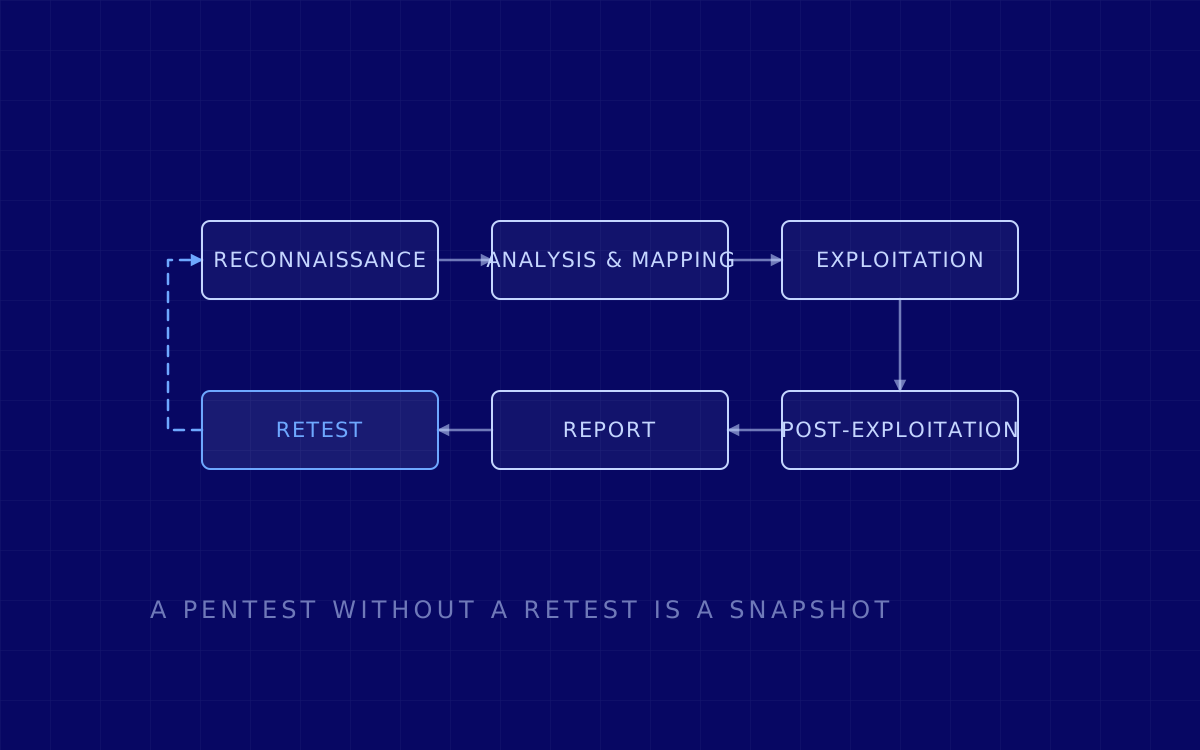
- An internal network pentest starts from the inside, with or without credentials, and answers how far somebody who is already in can get. It is the exercise that finds the six routes above. If you want to see how it is run, we walk through it step by step in how an internal network pentest works.
- A red team exercise answers the other half, the half almost nobody measures: whether anyone notices while it is happening. You can have a reasonably healthy directory and still not see anyone moving through it for weeks.
- And if your environment is hybrid, the review does not stop at the domain: Microsoft 365 hardening looks at the other side of the bridge, which is where intrusions that begin with a valid credential come in.
What to do with this
If you administer a domain, there are three things you can look at this week without hiring anyone, and they close off a fair part of the above. First, the service accounts: which ones have passwords from years ago, and which ones have more permissions than their task needs. Second, legacy authentication: which old protocols are still switched on and who actually uses them. Third, your certificate authority, if you have one: who can request certificates, and in whose name.
And a fourth one that is not technical: check whether you would know how to answer the question "what do we do if the domain controller stops being ours?". It is not a rhetorical question. It is a plan that has to be written down beforehand, because on the day you need it there is no directory left to lean on while you write it.
Last reviewed 3 August 2026. Originally published 19 November 2023.